
01Supportability
An Access application is still valuable, but the current setup is becoming difficult to support.
Microsoft Access Modernization
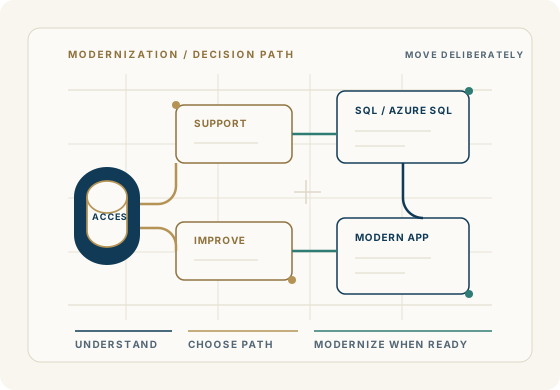
Modernization should start with what your Access application already contains: data, business rules, reports, workflows, and the knowledge your organization cannot afford to lose.
Begin a DiscussionWhen modernization should be considered
Some Access applications need support. Some need careful improvement. Some need a stronger data platform or a new application path.
An Access application is still valuable, but the current setup is becoming difficult to support.
The database is slow, hard to share, or strained by multi-user use.
The business needs to consider SQL Server, Azure SQL, or another approved data platform.
Important workflows and reports need to be preserved before any technology change is made.
Leadership needs a practical modernization path instead of a forced replacement pitch.
The organization needs to know whether to support, improve, migrate, or rebuild.
What modernization can include
Reviewing the current Access application, data, workflows, reports, and business rules.
Identifying what should stay in Access, what should be improved, and what may need to move.
Planning SQL Server or Azure SQL options when the data layer needs more strength.
Separating modernization decisions from urgent support issues so the business can move safely.
Creating a practical path for staged improvement, migration, or replacement when justified.
Avoiding unsupported remote-use or platform claims unless the real target architecture is confirmed.
Decision before migration
Before choosing the target
Legacy Access applications often contain years of operational rules that are not fully documented anywhere else. Those rules should be understood before data, reports, or workflows are moved.
A modernization path may involve keeping Access, strengthening the data layer with SQL Server or Azure SQL, or planning a modern application. The right path depends on the business case.
Common Microsoft Access modernization questions
Common Microsoft Access problems often point to a more specific next step. These pages help connect the symptom to support, development, modernization, or a careful data-platform decision.
Decide what to keep, improve, migrate, document, or replace.
Migrate Access to SQL ServerPlan the backend move while preserving useful Access forms, reports, and workflows.
Access with Azure SQLEvaluate Azure SQL as a backend option without overclaiming what Access becomes.
Slow Access databaseFind out whether performance can be improved before a larger modernization decision.
Begin a discussion
Share what is becoming difficult, what still works, and what the business needs next. We will help you decide whether support, improvement, data migration, or a new platform is the practical path.
Begin a Discussion