
01Performance
The Access database is slow, fragile, or difficult to support.
How to modernize an Access database
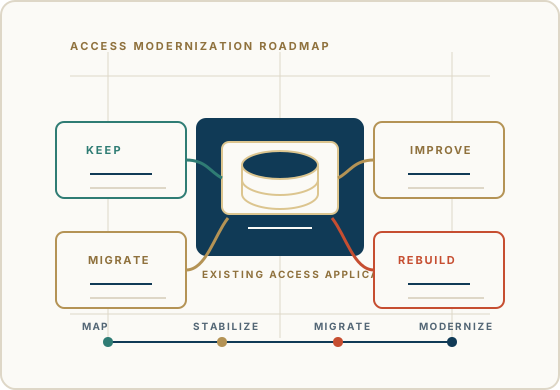
Modernizing a Microsoft Access database does not have to mean throwing away everything that works. Many Access applications contain valuable workflows, reports, business rules, and institutional knowledge that should be understood before technology decisions are made.
The practical path is to find what should be kept, what should be improved, what should move to a stronger data platform, and what should eventually become something new.
Discuss an Access Modernization PathWhy modernize
The database may be old, but age alone is not the issue. The question is whether the system still supports the business reliably, safely, and practically.
The Access database is slow, fragile, or difficult to support.
Multiple users, locations, or departments need a more reliable data environment.
Important business rules are trapped in forms, reports, queries, macros, or VBA.
The original developer is gone and the application is hard to change safely.
The organization needs better reporting, integrations, security, workflow, or long-term support.
Access still does useful work, but the current architecture no longer fits the business.
Modernization path
The safest work usually happens in stages: understand, stabilize, choose, test, and then modernize the right parts.
What modernization can include
The right combination depends on what the application does today, what the business needs next, and what cannot be disrupted while the work is underway.
Repair reliability issues, remove avoidable clutter, improve backups, and make the current application safer to maintain.
Review queries, indexes, forms, reports, VBA, linked tables, and multi-user deployment before assuming replacement is necessary.
Give each user a local Access front end while the shared data is managed in a properly configured back end.
Move tables and data to SQL Server or Azure SQL when scale, reliability, security, or remote access warrants it.
Replace the parts that need browser, mobile, integration, or automation capabilities while preserving proven workflows elsewhere.
Build a new application only when the business case is clear and the existing rules, data, and user needs are understood.
Decision frame
Modernization or replacement?
The application still fits, but performance, supportability, documentation, or deployment needs work.
The Access front end remains useful while the data moves to a stronger SQL Server or Azure SQL backend.
A new web or business application is justified by requirements the existing architecture cannot meet.
Possible outcomes
A mature modernization plan chooses the path that fits the application and the business instead of forcing every system into the same answer.
If the application still fits the business, modernization may mean better structure, cleaner queries, improved forms, stronger backup discipline, and supportable VBA.
If the front end works but the data layer needs to mature, SQL Server can become the backend while Access continues to support familiar workflows.
When managed cloud data is a good fit, Azure SQL may support the backend while the Access application is reviewed, tuned, and supported.
If the organization needs a different user experience, integrations, or web access, selected workflows may move into a modern application over time.
Cost and timing
A focused cleanup or front-end/back-end separation may be relatively contained. A business-critical application with complex VBA, many reports, integrations, multiple user groups, or limited documentation requires more analysis and testing.
Before recommending a large change, we identify the application's dependencies, risks, priorities, and realistic stages. That gives the business a clearer basis for deciding what to do first and what can wait.
40+ years of business database experience
The database file is only part of the system. The deeper value may live in how reports are produced, how exceptions are handled, how users search and enter data, and how VBA or queries enforce business logic.
Access For Business helps organizations make modernization decisions with that context in view, so the next system preserves what the business still needs.
Preserve before changing
Current production files, backups, and local front-end copies.
Tables, relationships, field meanings, lookup assumptions, and data quality issues.
Queries, reports, forms, macros, VBA routines, references, and startup behavior.
User workflows, exceptions, exports, recurring reports, deadlines, and informal workarounds.
Business rules that exist in code, queries, reports, or team habits rather than formal documentation.
Avoid the common trap
Assuming the entire Access application is bad because it is old.
Moving tables before understanding how forms, reports, queries, and VBA use them.
Treating SQL Server, Azure SQL, or a modern application as an automatic fix.
Replacing screens without knowing which user workflows depend on them.
Ignoring backups, rollback plans, permissions, reporting, and user testing until the end.
How we can help
Reviewing the current Microsoft Access application and the business processes it supports.
Identifying what should be kept, improved, retired, migrated, or rebuilt.
Planning SQL Server, Azure SQL, split-database, or modern-application paths when appropriate.
Reducing risk by documenting business rules, dependencies, users, and production workflows.
Creating a staged modernization plan that protects the business while the technology changes.
FAQ
The right answer depends on the application, the business process, and what needs to remain stable while the system changes.
Start by understanding the current application, business workflows, data model, forms, reports, queries, VBA, users, and pain points. Then decide whether to improve Access, move the backend to SQL Server or Azure SQL, replace selected workflows, or rebuild the application.
Not always. Modernization can mean stabilizing Access, improving performance, documenting the application, moving data to SQL Server or Azure SQL, or replacing only the parts that need a different architecture.
Often, yes. Useful Access forms and reports may remain while the data backend or selected workflows change. They should be reviewed and tested before production use depends on the new architecture.
SQL Server or Azure SQL may be worth considering when data has grown, multi-user reliability matters, administration requirements increase, reporting needs mature, or the current Access backend limits the business.
Preserve backups, production files, local front ends, table structure, queries, forms, reports, VBA, user workflows, business rules, permissions, and reporting requirements before major changes begin.
The safest first step is a practical review of what the Access application does, what cannot break, what is causing pain, and which modernization path fits the business rather than forcing a rewrite too early.
Begin a discussion
Share what works today, what is failing, what the business needs next, and what cannot be lost in the modernization process.
Begin a Discussion