
01
The database may be corruptedCorruption can affect tables, queries, forms, reports, VBA, or the database structure itself.
See Access database corruptedAccess database won't open
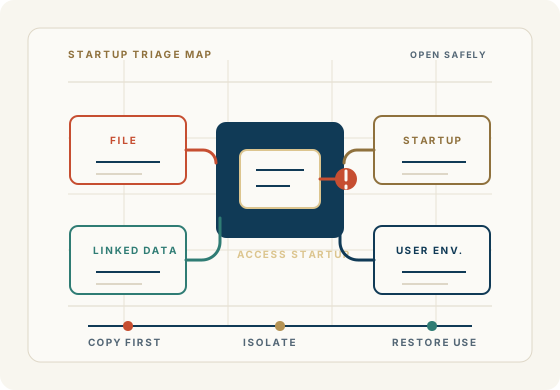
When a Microsoft Access database suddenly won't open, the first question is usually: “Is my database corrupted?” Maybe—but corruption is only one possibility.
An Access database that won't open can be caused by database corruption, a damaged file, network problems, permissions, another user having the database open, an Access or Windows problem, version compatibility, or an issue with the way the application has been configured.
If the database contains important business information, don't assume the worst—and don't immediately start experimenting with the original file. Access For Business can help determine why your Microsoft Access database won't open and what can be done to recover it.
Get Help With an Access Database That Won't OpenWhy it will not open
The first step is finding out whether the problem is the database file, the startup path, the shared environment, or the workstation trying to open it.
Corruption can affect tables, queries, forms, reports, VBA, or the database structure itself.
See Access database corruptedIn a multi-user environment, lock information, unexpected shutdowns, or network interruptions can leave the file in an unusual state.
Connectivity, server availability, mapped drives, permissions, disconnected users, or front-end/back-end configuration can prevent normal opening.
Review Microsoft Access supportMicrosoft recommends splitting a shared Access database into a front end and back end, with users working from local copies of the front end. That architecture can improve performance and reduce network traffic in the right environment.
Opening symptoms
The exact symptom matters. Different errors can point toward corruption, locking, permissions, startup code, or an environment problem that is not actually inside the database file.
This may point to corruption or a structural problem that should be handled from a preserved copy.
This can involve another user, a lock condition, or a shared-file/network environment issue.
The file, permissions, Access environment, and database condition all need to be checked.
Startup forms, corrupted objects, VBA, references, add-ins, or application configuration may be involved.
That often points to Access version, Office installation, references, permissions, network, or local configuration.
Before repair
The objective isn't simply to make the file open. The objective is to get the business application and its data working reliably without unnecessarily risking the information it contains.
Microsoft Access database diagnosis
With more than 40 years of experience working with business databases and applications, we determine the safest path to getting your application and data working again.
Is the database itself damaged?
Is the problem actually Windows, Office, permissions, or networking?
Are startup forms, VBA, references, macros, or other objects causing the failure?
Is the database being used correctly in a shared environment?
Can the data and application components be recovered?
Does the database need repair, restructuring, or modernization?
Repair, recovery, or modernization
Not necessarily. A database that will not open may be repairable, recoverable, or worth restructuring before anyone makes a larger replacement decision.
The right answer depends on what is damaged, what the application does for the business, whether reliable backups exist, and whether the current architecture still fits.
Possible outcomes
The existing database can be restored and returned to a reliable working state.
The data or application may need more extensive recovery from backups, objects, code, or usable copies.
The database may be recovered, while the underlying architecture is changed for stronger long-term use.
SQL Server context
SQL Server does not eliminate every application problem, but it can be the right backend when data volume, user count, availability requirements, or the shared-file environment have outgrown the current Access architecture.
FAQ
Practical answers for separating corruption, locked files, network problems, permissions, application startup errors, and replacement decisions.
An Access database may fail to open because of corruption, a damaged file, permissions, networking, another user or lock condition, Access or Windows configuration, version compatibility, startup forms, VBA, references, or linked tables.
Start by protecting the original file, making a copy, checking backups, noting the exact error, and determining whether the problem happens on one computer or every computer. The correct fix depends on whether the issue is the database, the application, or the environment.
Sometimes. Minor issues may be repairable, while serious corruption may require recovery or reconstruction. A copy of the original database should be preserved before repair work begins.
An ACCDB file may fail to open because of corruption, permissions, Access version issues, network problems, lock conditions, startup code, linked tables, or workstation-specific configuration.
An older MDB file can be affected by file damage, Access version compatibility, permissions, references, startup objects, or the environment where the file is being opened.
Make a copy before attempting repair, preserve the original file, and check whether a recent backup exists. If the database is business-critical, professional diagnosis before repeated repair attempts may be the safest path.
That often indicates an environment issue: Access version, Office installation, references, trusted locations, permissions, mapped drives, network access, or local configuration.
The problem may involve network connectivity, server availability, mapped drives, permissions, disconnected users, lock conditions, or an improperly configured shared database.
In some cases, yes. The likelihood depends on what has been damaged and how severe the problem is. The priority is protecting the original file and recovering reliable data and application components when possible.
Recovery usually starts with preserving the original file, reviewing backups, assessing whether the file or environment is at fault, and determining whether tables or other objects can be recovered safely.
Yes. Many Access repair and support situations involve inherited applications. The work starts by understanding the file, tables, queries, forms, reports, VBA, linked data, and deployment environment.
Not automatically. The application may be repairable, recoverable, or worth restructuring. Modernization should be based on the cause of the problem and the business requirements, not simply the fact that the file failed to open.
Begin a discussion
Share the exact error, what happens when the file opens, who is affected, where the file lives, whether backups exist, and what workflow cannot be interrupted.
Begin a Discussion