
01Startup
Access takes several minutes to open.
Microsoft Access database too slow
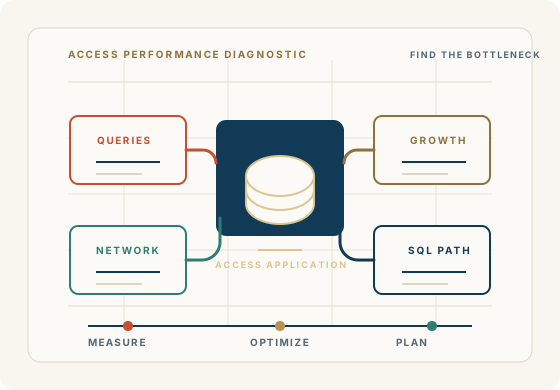
If your Microsoft Access database used to work well but now takes longer to open, search, save, or run reports, the problem is likely a collection of issues—not simply proof that your business has outgrown Access.
We examine the database structure, queries, forms, VBA, data environment, and network configuration to identify what is actually making the application slow and determine the most practical way to improve it.
Tell Us What's SlowSometimes the answer is straightforward optimization. Sometimes the database needs to be restructured. And sometimes the right long-term path is SQL Server or Azure SQL while Microsoft Access remains the application front end.
What slow Access usually means
Access For Business helps organizations diagnose Microsoft Access performance problems by examining the database structure, queries, forms, VBA, data environment, and network configuration before recommending a practical path forward.
Access takes several minutes to open.
Forms take a long time to load, search, filter, or save records.
Queries suddenly take much longer than they used to.
Reports are slow to generate or print.
Searching records is sluggish.
Saving a record takes several seconds.
Why is my Access database so slow?
A slow Microsoft Access database may be affected by design, query structure, data volume, linked tables, network behavior, VBA, indexing, or the way users share the application.
Queries, forms, and reports can become slow when they pull too many records, repeat calculations, rely on weak joins, or ask Access to do work that should be filtered earlier.
An application that worked beautifully with 25,000 records may behave differently with millions. Growth can expose weaknesses that were not visible when the application was smaller.
Shared folders, VPN usage, file-server latency, permissions, and multiple users working against the same data can make an otherwise familiar Access application feel unpredictable.
A shared Access application usually needs a front end for forms, reports, queries, and code, plus a separate back end for tables. Sharing one application file can create avoidable performance and reliability problems.
VBA routines, linked-table behavior, startup processes, external data, old references, and accumulated design decisions can all slow the experience users see every day.
Slow queries
Inefficient joins that force Access to compare more records than necessary.
Unnecessary fields, unfiltered queries, or nested queries that keep processing more data than the user needs.
Calculations performed repeatedly in queries, forms, reports, or VBA routines.
Queries processing large amounts of data that were manageable when the database was smaller.
Poorly designed joins or missing indexes on fields used for filtering, sorting, grouping, or relationships.
Growth and network use
What does a slow Access database look like?
Access takes several minutes to open.
Forms take a long time to load, search, filter, or save records.
Queries suddenly take much longer than they used to.
Reports are slow to generate or print.
Searching records is sluggish.
Saving a record takes several seconds.
Multiple users cause the database to slow down or become unreliable.
The database becomes slower during the workday or behaves differently for different users.
Remote users experience poor performance.
The application occasionally appears to freeze.
Do not assume replacement
Microsoft Access continues to be practical for many business applications, particularly when the application is well designed and properly maintained. Before recommending a replacement, we look at the application itself and determine what is actually causing the performance problem.
The goal is not to replace technology simply because it is older. The goal is to make the business application work better and determine the right technology for where the business is going.
How it can be improved
Optimizing queries and indexes so the database does less unnecessary work.
Restructuring forms and reports that load too much data or perform repeated calculations.
Reducing unnecessary data processing that happens during startup, searching, saving, or reporting.
Improving VBA code, startup routines, linked-table behavior, and front-end distribution.
Properly splitting the database and reviewing the network or data environment.
Compacting and repairing where appropriate, while avoiding unsafe changes to production files.
Moving the data back end to SQL Server or Azure SQL when the business needs a stronger data platform.
When should you consider SQL Server?
The data has grown substantially and the same performance issues keep returning.
Many users need simultaneous access to the same business data.
Users work from multiple locations or the current file-sharing model is becoming fragile.
The application needs stronger centralized data management, reliability, security, backup, or integration.
Queries need more database-server processing than the current Access back end can reasonably provide.
Microsoft Access performance assessment
FAQ
Practical answers for teams trying to understand whether the issue is query design, growth, network behavior, or a larger architecture decision.
A slow Access database can be caused by database growth, inefficient queries, missing indexes, forms or reports that load too much data, network configuration, linked tables, multi-user setup, VBA processing, or workstation differences. The first step is finding where the delay begins.
Possible improvements include query optimization, better indexes, cleaner forms and reports, safer front-end distribution, reviewing linked tables, improving VBA, compacting and repairing when appropriate, and restructuring the data layer when the current setup is no longer enough.
Compact and Repair can sometimes improve performance by reducing unused space and cleaning up the database file. It is not a substitute for diagnosing slow queries, poor structure, network issues, or multi-user problems, and it should be used carefully with backups.
For shared Access databases, a split structure is often important: a front end for forms, reports, queries, and application objects, and a back end for tables. Each user should normally work from their own front-end copy rather than sharing one application file.
Data growth can make an Access database slower, but the better question is what the growth exposes. More records can reveal inefficient queries, missing indexes, overloaded forms, reporting bottlenecks, or a data layer that needs a stronger architecture.
Multi-user slowness can be caused by shared front-end files, locking behavior, network latency, permissions, linked tables, workstation differences, or a back end that is no longer suited to the way the business uses the application.
Often, yes. Slow Access queries may improve through better filtering, indexes, joins, saved-query structure, fewer repeated calculations, cleaner forms and reports, or moving heavier data work to SQL Server when appropriate.
SQL Server can help when data volume, concurrency, reliability, security, or centralized data management needs exceed the current Access back end. But it is not an automatic cure. The application, queries, forms, reports, and business workflow still need to be reviewed.
Often, yes. In some modernization paths, Microsoft Access can remain the front end while SQL Server or Azure SQL becomes the data platform. That can preserve familiar forms, reports, and workflows while strengthening the data layer.
Not automatically. A slow Access database does not mean the application has reached the end of its useful life. The right answer may be optimization, restructuring, better support, SQL Server planning, Azure SQL planning, or eventual replacement depending on the business need.
Talk to an Access performance specialist
Share what takes too long, how many users are affected, where the files live, whether the database is split, and what reports, forms, or workflows cannot be disrupted.
Begin a Discussion