
01Connection
Microsoft Access can connect to external SQL data sources, including Azure SQL, through linked-table approaches.
Can Microsoft Access be used with Azure SQL?
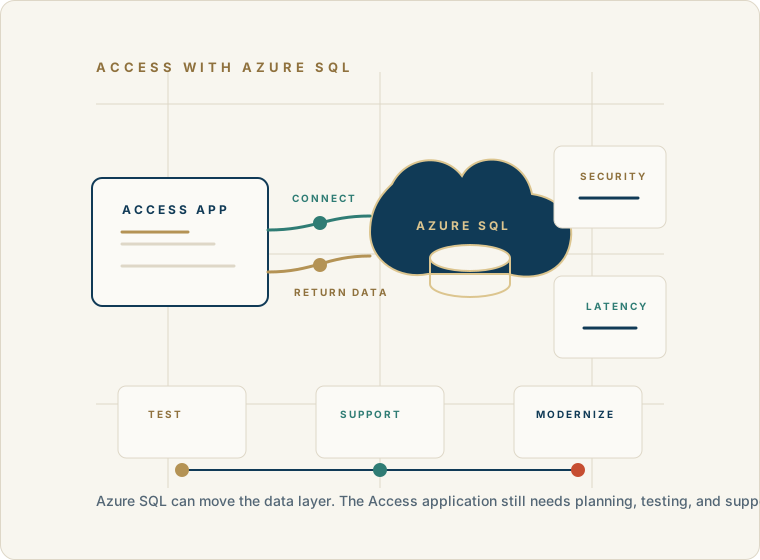
Yes. Microsoft Access can be used as the front end for an Azure SQL database. Access can continue to provide forms, reports, queries, VBA, menus, and user interaction while Azure SQL provides the centralized database backend.
But this is a database architecture decision, not a magic conversion. The Access application, user workflow, performance expectations, permissions, and long-term modernization goals all need to be reviewed before moving production data.
Discuss Access and Azure SQLShort answer
Azure SQL can mature the data layer, but the user-facing Access application still has to be understood, tested, supported, and sometimes adjusted.
Microsoft Access can connect to external SQL data sources, including Azure SQL, through linked-table approaches.
Azure SQL changes where the data lives; it does not automatically turn an Access desktop application into a web application.
Forms, reports, queries, VBA, user workflow, permissions, and performance still need to be reviewed and tested.
For some organizations, Access with Azure SQL is a practical step. For others, SQL Server, local optimization, or a modern replacement may fit better.
When it can fit
The organization wants a managed cloud database backend while keeping useful Access screens and reports.
Multiple users or locations need a more centralized data platform than a shared Access backend file.
The Access application still has business value, but the data layer needs stronger administration and backup discipline.
Leadership wants a staged modernization path instead of a complete rewrite all at once.
Reporting, integrations, or future application work may benefit from data being in a cloud SQL platform.
What stays where
Separating the application layer from the data layer makes the modernization decision easier to understand and test.
Architecture, not a shortcut
What to watch
Network latency, authentication, permissions, drivers, and connection stability matter more when data is remote.
Some Access queries or VBA routines may need adjustment when tables move to Azure SQL.
Large forms, unfiltered recordsets, and local query patterns can perform poorly against a remote backend.
Users still need the right Access front-end deployment, local configuration, and support process.
Cloud data does not remove the need to understand business rules trapped in forms, reports, queries, or VBA.
The application still matters
Forms may need narrower recordsets, better filtering, or redesigned lookups so they do not pull unnecessary data across the network.
VBA can remain in the Access front end, but code that assumes local tables, paths, DAO behavior, or connections should be evaluated.
Access SQL and Azure SQL are not identical. Views, pass-through queries, indexes, and server-side filtering can reduce repeated transfers.
Access reports can use Azure SQL data, but report queries should be tested against realistic volumes and concurrent users.
Evaluation path
A responsible path tests the connection, the workflow, and the performance before the business depends on the new backend.
Cloud database architecture should solve a real problem: reliability, centralization, administration, reporting, remote data needs, growth, or modernization planning.
Forms, reports, queries, macros, VBA, linked tables, and user workflows need review before the backend decision is made.
Azure SQL connectivity, authentication, linked tables, data types, indexes, and permissions should be tested with realistic users and data volumes.
Access screens and reports may need filtering, query changes, pass-through queries, or VBA updates to work well with a remote SQL backend.
A sensible rollout includes backups, cutover timing, user testing, front-end distribution, support, and a rollback plan if production issues appear.
Migration path
Azure SQL migration is a sequence of decisions, not a one-click file conversion.
What we inspect
A cloud backend affects connectivity, security, performance, rollout, and support. Those pieces need to be tested around the real application.
Keep the application reality visible.
40+ years of business database experience
Access For Business helps organizations decide whether Azure SQL, SQL Server, continued Access support, or broader modernization is the practical next step for a business-critical Access application.
The goal is to keep what works, improve what does not, and modernize when the application and the business are ready.
Compare paths
The right decision depends on the existing Access application, the users, the data, and what the organization wants the system to become.
If the application is small, stable, local, and working well, careful support or optimization may be more practical than changing the backend.
SQL Server can be appropriate when the organization wants stronger database management without necessarily using a cloud database service.
Azure SQL can fit when managed cloud data, centralization, and future modernization are important enough to justify the architecture work.
If the business needs a different user experience, web access, broader integrations, or major workflow redesign, a modern application may be the better long-term direction.
How we can help
Review whether Azure SQL fits the current Microsoft Access application and business requirements.
Map Access tables, linked data, forms, reports, queries, VBA, and business rules before changing the backend.
Evaluate Azure SQL connectivity, authentication, permissions, data types, indexes, and performance risks.
Identify which Access objects can remain and which queries, reports, or VBA routines may need adjustment.
Create a practical path across support, SQL Server, Azure SQL, cloud data, or broader modernization.
FAQ
These answers keep the architecture honest: Azure SQL can support the backend, but the Access application still needs planning.
Yes. Microsoft Access can link to external SQL data sources, including Azure SQL, so Access can remain the front end while Azure SQL stores the data in the backend.
No. Moving data to Azure SQL does not by itself create a web application. It changes the data layer; the user experience and deployment still need to be planned.
It depends on the organization, users, administration model, connectivity, security requirements, budget, and modernization goals. Azure SQL is one option, not a universal answer.
They may, but they should be tested. Some forms, reports, queries, or VBA routines may need changes when data moves from an Access backend file to Azure SQL.
Test linked tables, authentication, permissions, indexes, data types, forms, reports, query performance, VBA routines, user workflows, backups, and cutover steps.
Modernization may be better when the organization needs a new user experience, browser access, stronger integrations, major workflow redesign, or capabilities the existing Access front end cannot reasonably provide.
Begin a discussion
Share how the Access application is used today, what data needs to be centralized, who needs access, and what business problem the cloud database is expected to solve.
Begin a Discussion