
01
Database won't openCorruption, file access, permissions, startup logic, or the local Access environment.
Access database not working
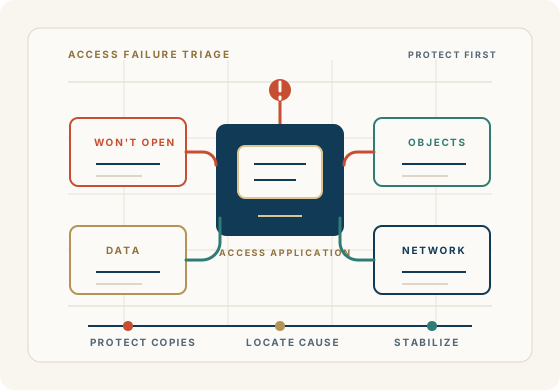
When a Microsoft Access database isn't working properly, the problem isn't always obvious. The database may open but forms don't work. A query may suddenly produce an error. Reports may no longer calculate correctly. VBA code may have stopped working. Users may be unable to share the database. The application may have become extremely slow—or it may have stopped working altogether.
Sometimes the problem is a damaged database. Sometimes it is a query, form, report, VBA routine, network configuration, Windows or Microsoft Office issue. And sometimes the application has simply outgrown the way it was originally designed.
Access For Business helps organizations diagnose and solve Microsoft Access database and application problems. You don't need to know what's wrong before you contact us. That's what diagnosis is for.
Get Help With Your Access DatabaseWhat “not working” can mean
This broad search usually means the user knows the business system is failing, but not yet whether the cause is the file, code, data, environment, network, users, or application design.
Corruption, file access, permissions, startup logic, or the local Access environment.
VBA, missing references, form design, underlying query changes, or data-source problems.
SQL changes, table structure, relationships, criteria, data types, or generated VBA SQL.
Query logic, calculations, data changes, grouping, filters, or report design.
Queries, indexes, data growth, network use, multi-user setup, or application architecture.
Network behavior, shared-file setup, front-end/back-end deployment, locking, or permissions.
Missing references, Office version changes, code errors, ActiveX/COM dependencies, or external apps.
Permissions, update queries, relationships, record locking, linked tables, or validation rules.
Microsoft Office, Windows, drivers, references, workstation replacement, or changed security settings.
Common situations
The useful first move is narrowing the symptom and then routing it to the right repair, support, development, performance, or modernization path.
The Access database will not open, opens inconsistently, or closes unexpectedly.
Forms, reports, queries, macros, or VBA code that used to work now fail.
Users see different results, missing records, locking behavior, or inconsistent data.
Linked tables, network paths, permissions, or workstation settings break normal use.
The database is slow, unstable, difficult to share, or unreliable for multiple users.
The original developer is unavailable and no one knows where to safely start.
What we ask first
One of the most useful questions in Access troubleshooting is simple: what changed? The problem is not always visible in the error message.
A new version of Microsoft Office or Windows was installed.
A computer, server, network path, or file location changed.
A new user, permission setting, report, query, table, or field was added.
VBA code, references, linked tables, or external dependencies changed.
The database began handling substantially more data or more simultaneous users.
First diagnostic questions
What exactly is not working: opening, searching, saving, reporting, data entry, startup, or a specific workflow?
When did it start, and what changed before the issue appeared?
Does the problem affect one user, several users, or everyone?
Is the application split into a front end and back end, and where do those files live?
What data, reports, users, deadlines, or business process cannot be disrupted?
From symptom to path
Choose the closest issue
This page is a triage gateway. The more specific the symptom, the safer and faster the next step can be.
If the file will not open or fails during startup, the first concern is preserving copies and determining whether the issue is corruption, startup logic, linked data, permissions, or the user environment.
Learn moreIf Access reports corruption or objects fail after a crash, network interruption, or unexpected shutdown, triage should protect backups before additional repair attempts.
Learn moreIf the database opens but key screens, reports, or queries fail, the path to the problem can usually be found by reviewing the object, its data source, and what recently changed.
Learn moreIf code or macros fail, the likely causes include missing references, changed Office versions, changed Windows environments, code errors, ActiveX or COM dependencies, and external application dependencies.
Learn moreIf the application technically works but has become slow, unstable, or hard to share, performance and multi-user behavior may be the real issue.
Learn more40+ years of business database experience
When an important Access application stops working, the first reaction is often to assume that the entire system needs to be replaced. That's not necessarily the case.
A well-designed Access application can often be repaired, improved, documented, or restructured to continue serving the business. If its data architecture needs to change, the data can potentially move to SQL Server or Azure SQL while the existing Access front end continues to provide the forms, reports, and business processes users already know.
We help you determine the most practical solution rather than jumping to an unproven path.
Access database problem diagnosis
Tables, relationships, queries, indexes, linked tables, and the way the data is organized.
Forms, reports, macros, VBA routines, startup behavior, references, and user workflows.
Microsoft Access, Office, Windows, workstation settings, network paths, file permissions, and external systems.
Data integrity, unusual records, growth, record locking, multi-user operation, and who is affected.
What changed before the problem appeared and whether the practical answer is repair, improvement, support, or modernization.
FAQ
Broad symptoms need a careful first pass. These answers help separate environment issues, repair, troubleshooting, support, development, and modernization.
An Access database may stop working because of corruption, startup errors, broken forms or reports, query changes, VBA errors, linked-table problems, permissions, network issues, workstation differences, or data growth.
A sudden failure often follows a change: Office or Windows updates, a moved database file, a replaced computer, a network change, modified tables or fields, broken references, or code changes. Identifying what changed is one of the fastest ways to narrow the problem.
That often points to the environment rather than the database itself. Differences can include Access or Office versions, missing references, trusted-location settings, permissions, drive mappings, linked-table paths, Windows updates, or local front-end copies.
Preserve copies and backups, capture the exact error or symptom, identify who is affected, and avoid repeated repair attempts on the only available file until the issue is understood.
Forms, queries, and reports can fail because of changed field names, broken joins, invalid criteria, missing references, data-type problems, changed linked tables, or VBA code that builds SQL or controls report behavior.
Access VBA problems commonly involve missing references, changed Office versions, changed Windows environments, code errors, ActiveX or COM dependencies, external application dependencies, or security/trust settings.
Yes. Many support situations involve inherited Microsoft Access applications. The work starts by understanding the forms, reports, queries, VBA, data, linked tables, and business rules before making changes.
No. Corruption is one possibility, but problems can also come from references, startup macros, VBA, permissions, linked tables, network paths, front-end/back-end setup, or changes in the business process.
Often, yes. The practical step may be repair, troubleshooting, better front-end distribution, query work, VBA updates, backup discipline, performance improvements, or planning a stronger data platform.
Modernization becomes worth discussing when failures keep returning, the application has outgrown its current structure, users need more reliable access, or the business needs capabilities the current Access setup cannot reasonably support.
Begin a discussion
Share the exact symptom, error message, affected users, recent changes, where the files live, and what workflow cannot be disrupted.
Begin a Discussion